Oninsta
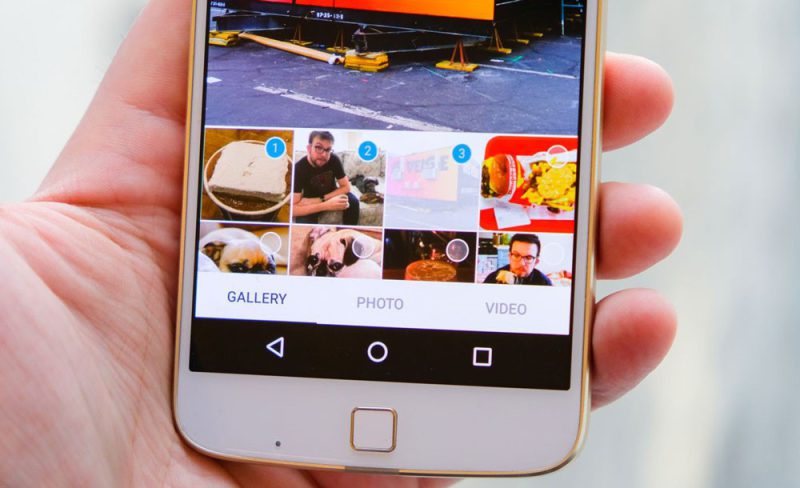
Bet you’ve been there, too, wanting to dump a bunch of awesome pics from a hangout or trip all at once on Instagram, only to smack into that solid Instagram photo limit.
You probably thought, “Why Can’t I Post More Than 10 Photos on Instagram 2025? What’s the deal with this rule, and can’t we get around it somehow?”
Don’t worry; in this post, we’ll break down this whole thing calmly and straightforwardly, showing you some cool workarounds. This way, if you ever want to share more photos, you’ll have options. So, follow us; we’ve got a lot to chat about!

What Are the Reasons for Can’t Post to 10 Photos on Instagram 2025 + Methods to Fix!
As of 2025, Instagram has officially increased the carousel limit from 10 to 20 photos and videos. You should generally be able to upload up to 20 items in a single post.
If you’re still encountering a 10-photo post limit in 2025, it’s likely due to specific issues rather than a platform-wide content posting restriction.
Here are the common reasons and their solutions for the Instagram photo limit:
1. Outdated App Version (Most Common)
The most frequent reason for not accessing new Instagram features, including the increased maximum number of images allowed per upload, is using an old app version.
- Solution
Update Instagram: Head to the Google Play Store (for Android) or Apple App Store (for iOS) and ensure your Instagram app is updated to the latest available version. Restart the App after updating.
2. Temporary Glitches or Software Bugs
Sometimes, the App itself may experience a temporary glitch or bug, leading to unexpected behaviour and affecting the platform’s performance.
- Solution
- Log Out and Back In: Sign out of your account and then sign back in. This often resolves minor temporary issues.
- Force Close the App: Completely close Instagram from your phone’s background processes, then reopen it.
- Clear Cache (Android Only): Go to your phone’s Settings > Apps > Instagram > Storage, and tap “Clear Cache.”
- Reinstall the App (iOS & Android): For iOS, directly clearing the cache isn’t an option, so deleting and reinstalling the App is the best way to clear its data. This also works for Android.
- Restart Your Phone: A complete device restart can often fix minor software glitches.
3. Internet Connection or Server Issues
Problems with your internet connection or Instagram’s servers can also interfere with app functionality, impacting the Instagram photo limit.
- Solution
- Check Internet Connection: Ensure your Wi-Fi or mobile data connection is stable and strong.
- Disable VPN/Proxy: If you’re using a VPN or proxy, turn it off and try again. These tools can sometimes interfere with app performance.
- Check Instagram Server Status: Use websites like “Downdetector” to see if Instagram is experiencing widespread server issues.

4. Gradual Feature Rollout (Rare)
In sporadic cases, Instagram may roll out new features gradually to different user groups, meaning some users may not yet be able to add more than ten pictures to a single post. This means that not everyone receives immediate access, which affects the rules for sharing visual content.
- Solution (if applicable)
- Patience: If this is the case, you may need to wait for the feature to become available for your account.
- Use Another Account (Temporary Workaround): Some users have reported success by creating the photo carousel on a different Instagram account that has a 20-photo limit and then choosing to share that post to their main linked account.
5. Account-Specific Issues (Less Common)
Occasionally, a specific issue with your account might prevent access to certain features, affecting the Instagram photo limit.
- Solution
Contact Instagram Support: If none of the above solutions works, reaching out to Instagram’s support team is your best bet to explain the problem.
In most scenarios, updating your Instagram app to the latest version will resolve the issue, as the official limit has been increased to 20 items.
Alternative Ways to Share More Than 10 Photos
While the multi-photo upload not working beyond 10 images in a single post can be frustrating, here are some alternative methods to share more visuals without directly challenging the Instagram photo limit.
- Instagram Stories: Stories enable you to share multiple photos and videos (up to 100 clips in a single Story) in sequence. You can enhance your Stories with stickers, text, music, and filters to make them more engaging and visually appealing. Stories are ideal for sharing everyday moments, short event recaps, and temporary collections of images.
- Reels: Reels are short-form video content on Instagram that lets you combine multiple photos and videos with music, effects, and text to create engaging and creative videos. Reels are a great way to share a collection of images with a specific theme or tell a short visual story.
- Splitting Content into Multiple Posts: If you’re set on sharing your images as regular posts, you can divide them into sets of 10 or fewer and publish each set as a separate post. To maintain visual consistency, consider using a similar editing style or theme across all the images and referencing the connection between the posts in your captions. This allows you to share all the photos you desire. However, it might slightly clutter your followers’ feeds, potentially leading to what some might consider an album-style post issue if not linked, all while respecting the Instagram photo limit.
- Using Photo Editing and Collage Apps: Many photo editing apps enable you to combine multiple photos into a single image, creating a collage. You can use these apps to arrange several of your pictures into one or more collages and then share those collages as single posts on Instagram. This method helps you share more images within a smaller number of posts, offering a way to upload several visuals at once.
- Creating a Facebook Album and Sharing the Link: While not directly on Instagram, you can make an album with as many photos as you like on Facebook and then share the link to that album in your Instagram Story or bio. This provides your followers with a single location to view all your images, serving as a guide for multiple image uploads on an external platform.
In Conclusion
The Instagram photo limit remain a reality in 2025. This limitation is in place for several reasons, including optimising the user experience, maintaining visual appeal, managing server resources, and discouraging spam.
However, Instagram offers viable alternatives, such as Stories, Reels, and splitting content into multiple posts, to help users share a larger number of images. By understanding these limitations and utilising the available alternatives, you can continue to address the challenge of posting more than 10 Photos on Instagram in 2025.
Share your experience with us; what creative solutions did you use to overcome the problem? Your story might help someone else in a similar situation. Don’t forget to tag a friend who should read this too!
Can you post 20 photos on Instagram?
Yes, you can post up to 10 photos in one carousel post. For 20, create two separate posts.
How do you make a story with more than 10 pictures?
Add them in batches; Instagram allows you to select up to 10 at a time, but you can continue adding more individually.
How do I add more than 10 photos to my Instagram reel?
Use a video editor to combine more than 10 photos into one video, then upload it as a Reel.
Is there an Instagram posting limit?
Yes, limits exist: up to 100 posts (including Stories) per day and 25 Reels per day.
Why is Instagram limiting me?
To prevent spam and ensure fair use. Limits reset every 24 hours.