Oninsta
How to record Instagram Stories and make your content stand out? Ready to captivate your followers with every post? Whether you’re a social media enthusiast, an influencer, or someone who loves capturing everyday moments, learning the tips in this post is essential.
In this ultimate Instagram Story guide, we’ll show you everything you need to know. Get ready for creative Instagram Stories ideas that will take your content to the next level! Let’s step up your Instagram game.
How Do I Record an Instagram Story? (iPhone & Android)
Recording Instagram Stories is simple and intuitive for iPhone and Android devices:
To begin to record videos on Instagram, open the Instagram app and swipe right from your feed or tap your profile picture in the top-left corner of the screen. This will open the Instagram Stories camera.
Once the camera is open, you’ll see the capture button at the bottom of the screen.
Press and hold the capture button to start recording Instagram Stories. If you want to take a photo instead, tap the button.
How to Edit the Video or Photo Before Posting on Instagram Story?
Stories feature on Instagram allows users to share moments creatively with various editing tools. You can enhance your photos and videos
using an iPhone or Android before posting.
Instagram also integrates seamlessly with iOS’s photo and video editing features, such as Live Photos, video trimming, and slo-mo video for iPhone users. These can be used for creative Instagram Stories ideas and make your Stories stand out.
With Android, you can also utilize certain apps that enhance video quality, such as FilmoraGo or Kinemaster. These apps offer more control over your editing and can help elevate the quality of your IG Stories.
How Do I Record an Instagram Story? (Window & Mac)
Since Instagram’s web version doesn’t support recording Stories, try these methods:
Use an Android Emulator (Windows & Mac)
- Download Bluestacks or NoxPlayer.
- Install Instagram from the Play Store.
- Open Instagram, record, and upload stories just like on mobile.
Use Chrome Developer Tools (Upload Only)
- Open Instagram on Chrome.
- Press Ctrl + Shift + I (Windows) or Cmd + Option + I (Mac).
- Click the mobile view icon, refresh, and upload a Story.
How Do You Record Hands-Free on Instagram Stories?
If you are curious about how to record an Instagram story without holding, Instagram has a hands-free feature.
To use this, open the Instagram Stories camera, swipe to the “Hands-Free” option on the bottom of the screen, and press the record button once to start recording.
This is perfect for capturing longer videos; this feature is also helpful when sharing activities like unboxing products, cooking, or showcasing a tutorial.
Instead of focusing on keeping the camera still, the hands-free mode lets you concentrate on the activity, all while capturing smooth video footage.
What Are the Best Techniques for Recording Instagram Stories?
The best features for recording Instagram short videos depend on the content you share and the effect you want to achieve. Here are some tips to help elevate your Stories:
1. Use the Right Lighting: Natural light works great, but ensure the lighting is bright even if you’re indoors. You can also invest in a ring light for consistent, flattering light.
2. Stabilize Your Camera: If you’re recording Instagram Stories, try using a tripod or stabilizer to prevent shaky footage. For iPhone users, a tripod with an iPhone mount works well.
3. Experiment with Filters: The IG Stories camera has many creative filters that can give your videos and photos a unique touch. Use different filters to find the one that suits your style or message.
4. Add Music and Text: Adding music or text overlays to your videos can enhance the storytelling. Whether you’re narrating your day or sharing a motivational message, text can help convey your point effectively.
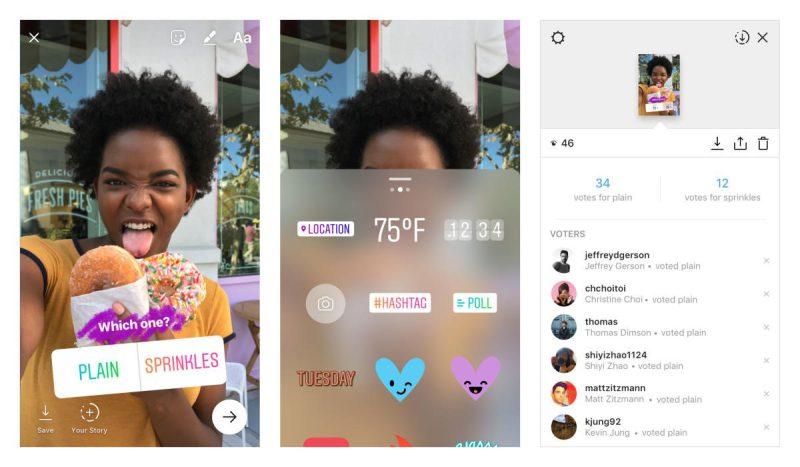
5. Polls and Quizzes: Engage with your audience using interactive tools like polls and quizzes. These features allow your followers to feel included and give them a chance to interact with your content.
6. User-Generated Content: Repost content from your followers or customers with their permission. This creates a sense of community and encourages more engagement.
7. Mini Tutorials: Share bite-sized tutorials or tips in a series of Stories. Whether it’s a cooking hack, fashion tip, or tech Instagram stories tutorial, these types of Stories are popular with followers.
8. Countdowns and Reminders: Use the countdown sticker for upcoming events or launches. This builds anticipation and keeps your audience looking forward to your posts.
With these techniques, the Stories feature on Instagram will look professional and polished, even if you’re starting. Don’t hesitate to experiment with these features to find your style.
Can I Record Someone’s Instagram Story?
While it’s technically possible to record someone else’s Instagram Story using third-party apps or screen recording tools, it’s important to remember that respecting other people’s privacy is crucial.
Instagram does not allow the direct downloading or sharing of someone else’s Story without permission. However, if you’re questioning, if you screen record someone’s Instagram story, will they know? The answer is no.
Instagram doesn’t notify users when someone screenshots or screen records their Story. However, always be mindful of privacy and ethical considerations when doing this. This ensures you respect their creative work and maintain good relationships with fellow Instagram users.
How Do I Save an Instagram Story Video?
There are a few ways to save an Instagram Story video, depending on whether it’s your own or someone else’s:
- To save an Instagram Story video, record your Story as usual, then tap the three dots (more options) at the top-right corner of the screen. From the options that appear, select “Save.” This will save the video to your gallery, and you can keep it for your records or repost it later.
- You can also save Instagram Story drafts, which lets you store unfinished Stories for future editing. For iPhone and Android users alike, you can use screen record; also, if you want to have sound in videos, you should use third-party apps and sites. This feature ensures you won’t lose any content you put effort into creating. If you decide to repost the video or re-edit it later, it’s saved in your phone’s gallery.
Conclusion
Recording Instagram Stories is your ticket to creating vibrant, engaging content that will captivate your followers. Whether you’re a newbie or a seasoned pro, mastering the Instagram short video camera will allow you to create Instagram Story content that truly stands out.
By applying the tips from this Instagram Story guide, you can capture your day, share your passions, and connect with your audience like never before!
Now that you know how to record Instagram Stories, it’s time to get creative! Start filming, experimenting, and having fun today! Comment on your experiments about using these tips, and add more if something is left.
Can I save a video from someone’s Instagram Story?
You can’t directly save someone else’s Story, but you can screen record it or use third-party apps.
How do you record longer stories on Instagram?
Instagram automatically splits videos longer than 15 seconds. You can use Reels for longer videos.
How to record Instagram stories on your iPhone?
Open the Story Camera, hold record, or use Hands-Free mode, then tap ⤓ to save.
Can I record Instagram Stories without posting them?
Yes, record using your phone’s camera or Instagram’s story feature and save it without posting.
Does Instagram keep a record of your Stories?
Yes, they’re stored in the archive after 24 hours.