Oninsta
If your comments were accidentally hidden, you should know “How to Unhide Comments on Instagram?”. Not restoring hidden comments could cause you to miss valuable feedback and interactions, limiting your followers’ engagement and the impact of your content.
Ready to see all the feedback you might have missed? Follow our simple, step-by-step Instagram hidden comment tutorial and enhance your experience today!
Why Instagram Hides Comments?
Instagram uses AI moderation tools to filter offensive or inappropriate comments automatically. Additionally, users can manually hide comments or replies. This is how:
- The “Hide Offensive Comments” setting is enabled.
- Keywords or phrases trigger filters.
- Manual action by the post owner.
- Instagram’s auto-detection system flags them as spam.
While these features promote a safer environment, they sometimes hide legitimate or valuable comments.
How to Unhide Comments on Instagram in 2025?
Hidden comments aren’t lost forever; they’re tucked away from view. This quick guide will help you bring those comments back to the surface and foster better engagement with your followers. Follow these steps to restore comments on Instagram:
o Open Your Profile: Navigate to your Instagram profile, then tap the post containing the hidden comment.
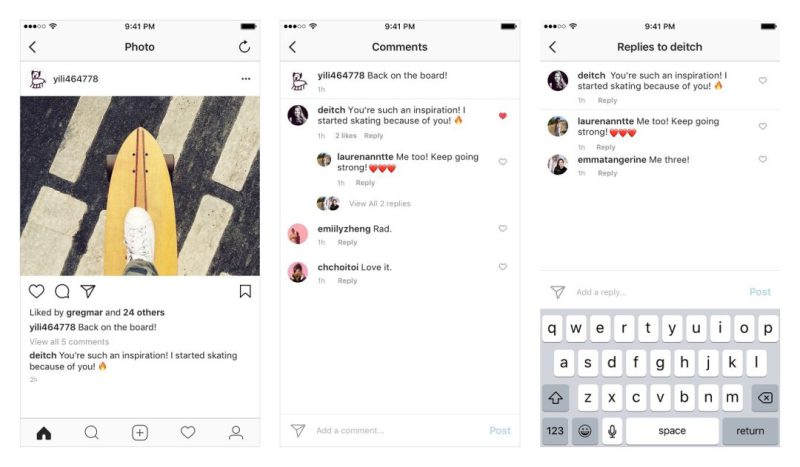
o Tap the Comment Icon: Tap the speech bubble icon to open the comments section under your post. If there are hidden comments, you’ll see an option like “View hidden comments.”
o Tap ‘Unhide’: Next to the hidden comment, tap “Unhide.”
o Confirm the Action: Instagram might ask for confirmation. Tap again to restore the comment and make it visible to everyone.
- Tip: If you don’t see the option to view hidden comments, no comments may be filtered on that post. Once you’ve done that, the hidden comment will reappear in the comment section and be visible to everyone again.
How to View Hidden Comments on Instagram Without Unhiding Them?
You can still view hidden comments without un-hiding them first. However, the catch is that Instagram doesn’t offer a specific area where you can simultaneously see all your hidden comments. To unhide them, you must go to the post manually and find the hidden comments.
- Go to the Post: Navigate to the post where the comment is hidden.
- Tap on “View Hidden Comments”: Instagram typically shows a prompt like “View X hidden comments” below the visible comments. Tap on this prompt to temporarily reveal the hidden comments without un-hiding them.
How to Adjust Instagram Comment Settings?
Instagram offers various comment settings to help you manage interactions. Whether you want to limit comments, block specific users, or turn them off altogether, these features ensure a safe and positive space that aligns with your preferences.
- Enable or Disable Comments: You can turn off or on comments for individual posts:
- Tap the three dots at the top of your post
- Choose “Turn off commenting” or “Turn on commenting.”
- Limit Comments Temporarily: This feature hides comments from non-followers or recent followers during sensitive periods:
- Go to Settings > Privacy > Comments
- Select “Limit Comments” and toggle the feature on.
- Block Specific Commenters: To avoid spam or harassment:
- Navigate to Privacy > Comments > Block Comments From
- Add usernames to restrict their ability to comment on your posts.
- Use Manual Moderation (Business Accounts): Business and creator accounts can manually review comments before they appear:
- Go to Settings > Professional Dashboard > Comments
- Enable Manual Approvals and set keyword filters
- Manage Instagram Comment Settings: Instagram’s manual keyword filters allow you to prevent certain words or phrases from appearing in your comments.
- Go to Settings > Privacy > Comments
- Toggle off “Hide Offensive Comments”
- Review or update your manual keyword filters.
- Delete or Report Comments: Swipe left on a comment to delete or report it for violations.
Final Thoughts
Knowing “How to Unhide Comments on Instagram?” gives you better control over your social interactions. Don’t let essential conversations slip by; dive into your settings, unhide those comments, and start fostering meaningful engagement today!
Have you ever hidden a comment by accident on Instagram? Or you may have noticed some hidden feedback you didn’t want to miss. Share your experiences or any tips you have in the comments below.
How do I unhide hidden comments on Instagram?
To do this, go to the post and tap “View Hidden Comments,”
How do I restore a comment on Instagram?
You can tap “View Hidden Comments” and “Unhide” next to the comment.
What happens if you hide a comment on Instagram?
When you hide a comment, it becomes invisible to others but still visible to you and the commenter.
How to view hidden comments on Instagram?
To view them, tap “View Hidden Comments” below the visible ones on the post.
Can I hide comments on Instagram without removing them entirely?
Yes, you can hide comments on Instagram so they’re invisible to others but still visible to you and the commenter.